speaker-sim by devfrp

Real speakers. In a real room. On your headphones.

Speaker Sim turns a pair of measured loudspeakers into a virtual audio output.

linux, bash

$ curl -fsSL https://devfrp.github.io/SimulSpeaker/install.sh | bash

Installed: no root, nothing outside your home

$ speaker-sim --set-speaker "Genelec 8030C" --start

[ 50 %] Haut-parleur L : sons directs et réflexions

[100 %] Filtres prêts

$ wpctl status | grep Speaker

 * Speaker Sim (Genelec 8030C) [Audio/Sink]

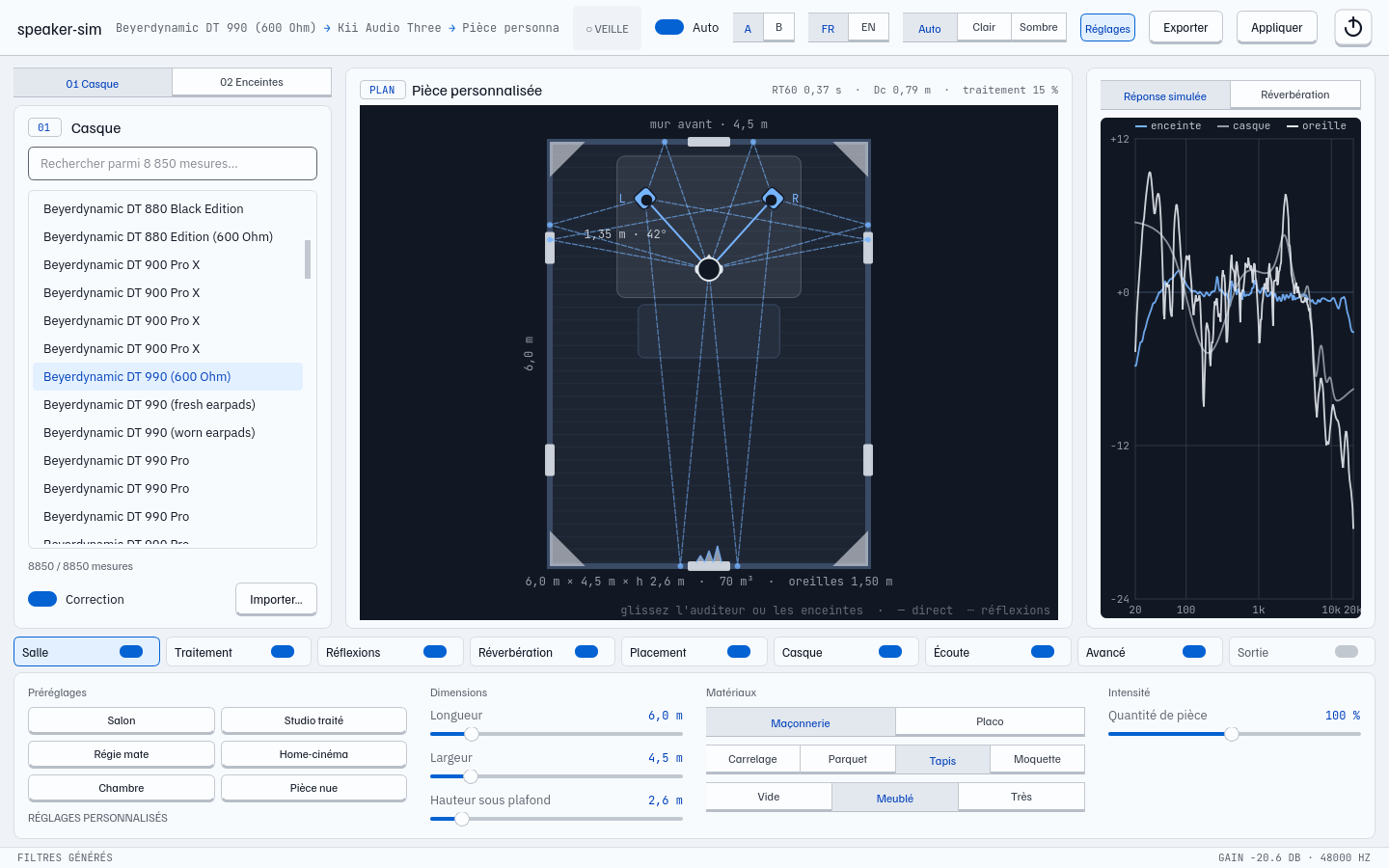
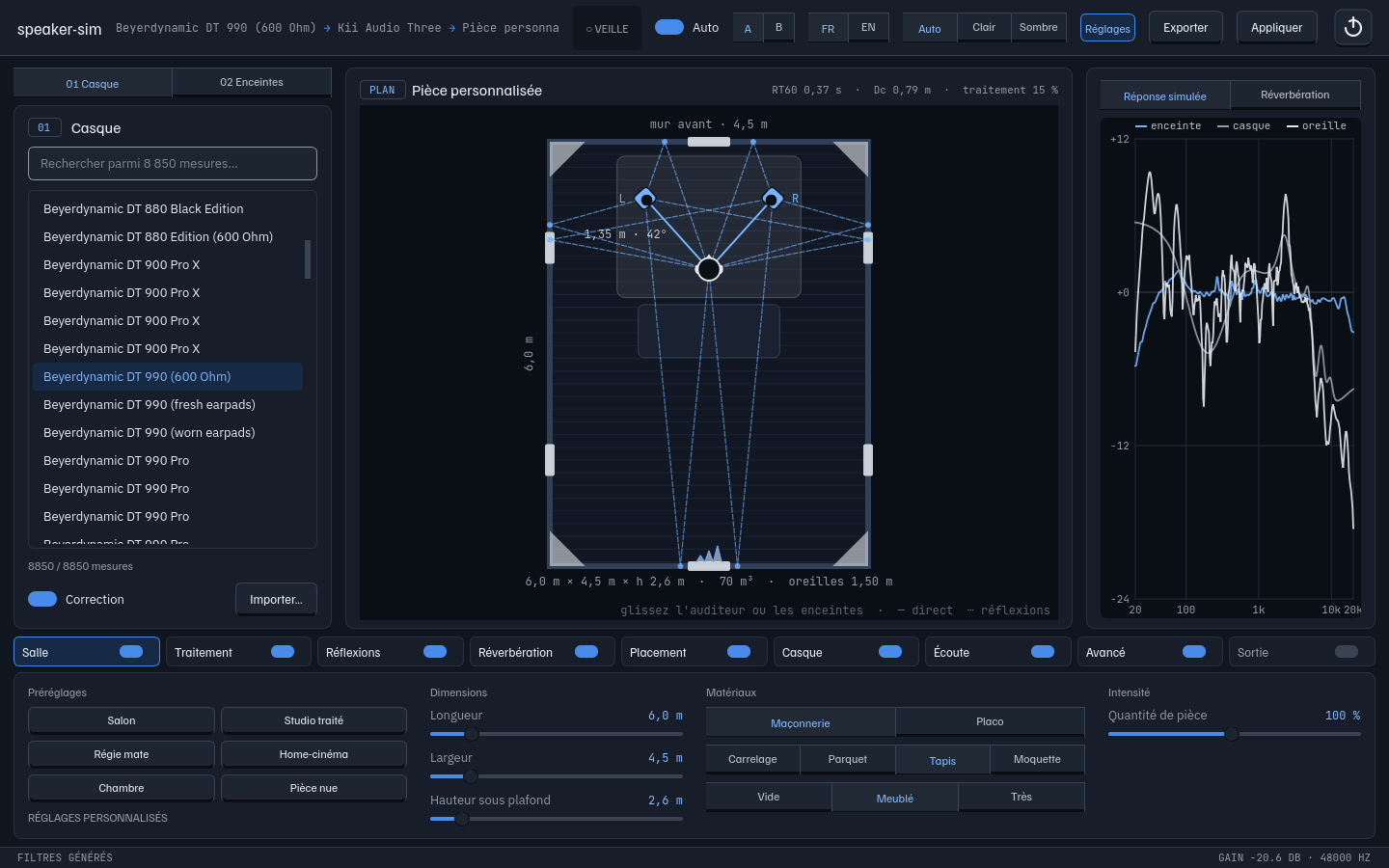
Speaker Sim main window: headphone and speaker strips, interactive top-down room plan, response and RT60 meters, room settings Speaker Sim main window: headphone and speaker strips, interactive top-down room plan, response and RT60 meters, room settings

A top-down plan of your virtual room: drag yourself or the speakers, dial in acoustic treatment and materials, and watch the reflections and RT60 change live.

In numbers

Every curve comes from published measurements, pinned to a fixed Git commit and downloaded once.

8 850
headphone EQs
130
measured speakers, 69 of them studio monitors
25
image sources per speaker
0
root privileges

How it works

Five stages are baked into four minimum-phase impulse responses (left/right speaker to left/right ear), then run by PipeWire’s convolver in a separate, user-level process.

  1. Speaker

    Listening Window for the direct sound, Early Reflections and Sound Power for what the room returns.

    CEA-2034, spinorama
  2. Room

    Real materials and acoustic treatment, absorption per octave band, RT60 per band (Eyring), and image sources filtered by every wall they hit.

    RT60 / octave, Eyring
  3. Head

    Each arrival is rendered through a KEMAR HRTF from its true direction, with exact fractional delays and diffuse-field EQ.

    libmysofa, SOFA
  4. Headphone

    Your model’s AutoEq parametric EQ, turned into a minimum-phase impulse response.

    AutoEq
  5. Output

    A virtual sink becomes your default output; stopping it restores the previous one, even if systemd stops it.

    PipeWire, systemd --user
IR[s][e] = HP⁻¹ × ( DF⁻¹ × ( LW × Direct[s][e] + ER × Reflections[s][e] ) + SP × Reverb[s][e] )

Download

Live simulation needs PipeWire, so it is Linux-only. On Windows and macOS the same engine exports the filters for a system-wide convolver.

Linux

live

One command. Installs into your home folder, adds a menu entry and the speaker-sim command.

  • Virtual PipeWire output, auto-start at login
  • Restores your previous output on stop
  • Never touches PipeWire / WirePlumber config
curl -fsSL https://devfrp.github.io/SimulSpeaker/install.sh | bash
Read the script first

Windows

export

A single .exe. Builds the filters and writes a ready-to-include Equalizer APO configuration.

  • Equalizer APO ≥ 1.2 (virtual channels)
  • 4 mono WAVs + a 4-channel true-stereo WAV
  • Unsigned: SmartScreen, then More info, then Run anyway

macOS

export

A native .app in a .dmg. Exports true-stereo impulse responses for any convolution plug-in or host.

  • Apple Silicon and Intel builds
  • Same engine, pure-Python SOFA reader
  • Unsigned: right-click, then Open the first time

Builds are produced by GitHub Actions from the tagged source; each binary is smoke-tested by actually exporting filters before release. SHA-256 checksums are attached to every release.

FeatureLinuxWindowsmacOS
Live virtual output✓ PipeWirevia Equalizer APOvia a convolver
Headphone + speaker selection✓✓✓
Room simulation & curves✓✓✓
Auto-start, output restore✓ systemdnono
Export WAV / Equalizer APO✓✓✓

FAQ

Short answers. The README has the long ones.

What does it write on my system?

Settings and filters in ~/.local/state/devfrp-speaker-sim, measurements in ~/.cache/devfrp-speaker-sim. Enabling auto-start asks systemd to link the unit, which creates symlinks under ~/.config/systemd/user; disabling removes them.

What does the acoustic treatment rate change?

It is the share of the walls covered with absorbing panels. Panels soak up the mids and highs much more than the bass, so the RT60 meters drop above 250 Hz first; add bass traps to tame the low end. Six presets go from a bare room to a very dead control room.

Why is it quieter than direct playback?

Filters are normalised for the worst case (the same signal on both speakers), so nothing ever clips. Raise the preamp if your material leaves headroom.

Does it work offline?

Yes, for anything already in the cache. Sources are pinned to a Git commit, so a cached file never changes and is never downloaded twice.

Why a generic KEMAR head?

It is the reference most measurements are built around. Any SOFA file can be set as sofa_file in the configuration if you have your own HRTF.

How do I update or uninstall on Linux?

Re-run the curl command to update. Append “bash -s -- --uninstall” to remove the app (settings kept) or “--purge” to remove settings too.

Where does the data come from?

AutoEq by Jaakko Pasanen (MIT), Spinorama by Pierre Aubert (GPL-3.0) with ASR Klippel NFS measurements, and the MIT Media Lab KEMAR set. Data is fetched on demand, not redistributed.